Last updated:
🔔 Update (December 14, 2025): Avast SecureLine VPN No Longer Works in India
Important: This tutorial is no longer applicable for users located in India.
As of January 2025, Avast has permanently disabled SecureLine VPN and all Avast VPN services in India due to compliance issues with local CERT-In data-retention regulations.
As a result, Avast SecureLine VPN now displays a territory restriction message and cannot connect from within India, regardless of device, Android version, or workaround used.
Because this is an official service restriction, the previously mentioned fix for Avast SecureLine Error 2.2.13 (including the Samsung Max VPN method) no longer works.
What This Means for Users
- Avast SecureLine VPN cannot be used in India at this time.
- Reinstalling the app, clearing cache/data, or using older APKs will not resolve the issue.
- The VPN will only function if the device is physically located outside India.
Recommended Alternatives
- Switch to a VPN provider that still operates legally in India
- Use Avast SecureLine VPN only when traveling abroad
- Request a refund or subscription adjustment from Avast if applicable
This article has been updated to prevent confusion and reflect the current status of Avast VPN services in India.
Warning: This workaround may not work anymore in India due to Avast blocking VPN services.
Avast SecureLine users in India have hit a wall lately—their VPN app’s been blocked thanks to a directive from the Computer Emergency Response Team (CERT-In).
The agency’s laid down new rules for a bunch of commercial VPN providers, Avast included, and now users are seeing an error 2.2.13 in the app that stops them from getting online with it.
On top of that, the app is no longer available on the Indian Google Play Store, so downloading it anew isn’t possible. If you’re someone who has paid for a subscription and still has the app installed on your Android smartphone or iPhone, though, there’s hope.
This article provides a way to get the app functioning again and work around that error 2.2.13.
How to Fix Avast SecureLine Error 2.2.13?
When Indian users open the Avast SecureLine app these days, they’re greeted with a frustrating message: “SecureLine is Blocked. Sorry, due to local restrictions, SecureLine won’t work in this location.” But there’s a potential fix that can get around this, and it involves using the Samsung Max VPN app.

If you’ve got a Samsung phone, this app usually comes pre-installed, which is handy. For those with non-Samsung phones, you’ll need to grab it from the Google Play Store.
Unfortunately, iPhone users are out of luck here—Samsung Max isn’t available on iOS. If you’re on an iPhone, though, you can still pick up a different VPN from the App Store and follow along with this guide.
Now, a heads-up: Samsung Max VPN isn’t completely free. You’ll need to buy a subscription to use it fully, though there’s a neat trick—if you watch a few ads in the app, it’ll give you some free VPN time, usually enough for a few hours.
Once you’ve got Samsung Max VPN connected, it works its magic by hiding your real IP address and making it look like you’re in another country. That’s standard VPN stuff, and it’s enough to trick Avast SecureLine into thinking you’re not in India anymore, bypassing the location block.
So, if you’re using a Samsung Android phone, this guide is especially for you—it’ll help you ditch that annoying Error 2.2.13. See the step-by-step instructions below!
- Step 1: Connect your Samsung Android phone to internet or Wi-Fi and open Samsung Max VPN.
- Step 2: Tap 'Privacy protection' and then you will see an option asking you to watch an advertisement.

Samsung Max VPN providing privacy protection. - Tap the 'Watch ad' button and view or watch the ad completely unless you see the close (X) button in the top right corner. Once you see the close (X) button, tap it. You will immediately see a message saying that "4 hours added to privacy protection time." This means that your Samsung Max VPN will now work for 4 hours. Please note that if the 'Basic plan' is activated then you will have to activate the 'Premium plan' first.

Samsung Max VPN: watch a free ad to activate VPN service. - Step 3: Now go back to the main page of the Samsung Max VPN app and you will see that the VPN is connected to a different country other than India.
- Step 4: Long tap on Avast VPN app and tap the 'i' icon to open the 'App info.' Tap 'Force stop' to close it. Now go back to the home screen.
- Step 5: Open Avast SecureLine app now and you will not see any restriction message or the error 2.2.13. This is because your VPN location has been changed from India to some other country and because Avast SecureLine is not blocked in a different country therefore it starts working again.
- Step 6: Tap 'Connect' to connect the Avast SecureLine and start using it. If you wish to change the server then tap 'Server location' and select your required location. Tapping on your desired location will automatically connect the Avast SecureLine VPN. You can now continue using your Avast VPN app.
Important Note: The workaround works for a few days only. After sometime Avast SecureLine will again start detecting your location as India and block itself again. If this happens then you can repeat the steps given above to make it work again.
How Can You Download The Avast SecureLine App After It Was Removed From The Google Play Store?
The Google Play Store in India has already pulled Avast SecureLine, so no one can download it directly anymore. Because of this, a lot of users might be tempted to hunt for the APK file on third-party websites. I’ve got to be honest—I wouldn’t recommend going that route.
You could end up with some seriously nasty stuff like malicious apps that leave your phone open to security risks, malware, spyware, or even ransomware. That said, if you’re set on downloading the Avast SecureLine APK anyway, there’s a safer option: head to APKMirror.com. It’s a reliable site that’s known for hosting trustworthy Android APKs.
Download the APK and install it on your phone. Samsung Android phones block installation of APKs because of its auto-blocker feature. You will need to turn-off auto-blocker before you can install the APK file. Go to Settings > Security and privacy > Auto Blocker. Turn this off for a while, install the Avast SecureLine app and then again turn auto-blocker on.
- After installation, open Avast SecureLine VPN app and tap connect. The app will tell you that you don't have a valid subscription.
- If you have the app activation code (that you got after purchasing officially from Avast), tap 'ALREADY PURCHASED.'

Avast SecureLine VPN blocked in India, showing connection error. - Now tap the option 'Enter activation code.'
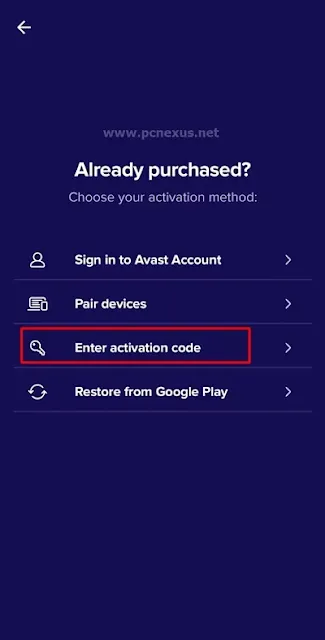
Avast SecureLine VPN blocked in India with error message. - Here enter the activation code and tap 'ACTIVATE' button. At this point your VPN app will activate if the subscription is valid but it will show you error 2.2.13. To fix this, you can follow the steps that I have just shared somewhere above.
Why Avast SecureLine and Other VPN Apps Blocked In India?
CERT-In, India’s cyber response team, put out a set of rules to keep VPN usage in check, asking all the major VPN providers to follow along. These rules require them to log a bunch of user info—like your IP address, payment details, full name, email, home address, device ID, and even real-time traffic data—and hold onto it for five years. They rolled out these regulations as a way to tackle the rampant cybercrime in India, which has been a real problem lately.
The new regulations didn’t just go after Avast SecureLine—they hit other big VPN players like NordVPN, ExpressVPN, and CyberGhost too, telling them to either follow the new data retention rules or get out of India.
It’s caused a real uproar, and honestly, I can see why.
Privacy folks are up in arms, saying it’s a huge overreach that stomps all over our online freedom. Thing is, none of these VPN companies went along with CERT-In’s demands. Instead, they pulled their services from India to keep our privacy intact, which I’ve got to say, I respect them for.
This article is meant just for legit Avast SecureLine users—those who’ve paid for a subscription and either haven’t gotten a refund or only received a partial one.
Conclusion
So, yeah, the block on Avast SecureLine in India because of CERT-In’s rules has been a pain for a lot of us. But the workaround I’ve shared here should help you get around it and keep using the VPN on your Samsung Android phone. Just a heads-up, though—this might only work for a little while, and the problem could pop back up later.
If you need to download the app, steer clear of those shady third-party sites and stick to sources you can trust. I’m not here to cheer on anything illegal or push back against CERT-In’s rules—just trying to help out. If this guide works for you, pass it on to anyone else stuck in the same situation.


%20Games%20on%20Android%20and%20PC.webp)


No comments:
Post a Comment