Java (.JAR) games used to be everywhere on old Nokia phones, N-Gage and those early keypad mobiles from Sony Ericsson and Motorola. These small .jar files ran on something called the J2ME (Java Platform), which pretty much powered mobile gaming back then.
Then Android and iOS showed up around 2007 and everything shifted. Java phones slowly disappeared, but the games didn’t really vanish. You can still find titles like Asphalt, Prince of Persia, Sky Force, and Bounce floating around in .jar format.
If you’re trying to run Java (.jar) games on Android, it’s still possible. You just need a simple emulator, and the steps below will get you there without much trouble.
%20Games%20on%20Android%20and%20PC.webp)
What You Need to Run Java (.JAR) Games on Android
Before you start, you only need a couple of basic tools. Once set up, Java (.JAR) games run smoothly through an emulator.
- J2ME Loader APK – JAVA Games Emulator for Android
- Java (.JAR / .JAD) game files – use games you already have or backed up on your device
Disclaimer
Be careful where you download Java (.JAR) games from. A lot of random sites hosting old .jar files are unsafe and often filled with aggressive ads or malware traps.
Stick to files you already own or trusted sources. If a site pushes you toward unknown APK(.apk) files or anything that looks off, close it immediately.
It’s not always clear whether these games are still legally distributable, so downloading them carries some risk. If you still choose to proceed, that’s your decision.
Before opening any .jar file, scan it with a proper antivirus app.
How to Play Java (.JAR) Games on Android Using J2ME Loader
Here’s how to run Java (.JAR) games on Android using J2ME Loader. Follow the steps below.
Download and install J2ME Loader which is the best java games emulator for Android.
Make sure to put all your .jar games in a folder named 'Java' on your phone's internal storage.
After installation, open the J2ME Loader app and tap the '+' button to locate the .jar files in the 'Java' folder on your phone's storage. Add all the games to J2ME Loader one by one by tapping the '+' button.

Here, you will see all the game files. Tap any game to load it in the J2ME Loader emulator.

A popup will open as the 'MIDlet Installer.' Tap 'START' to run the game.

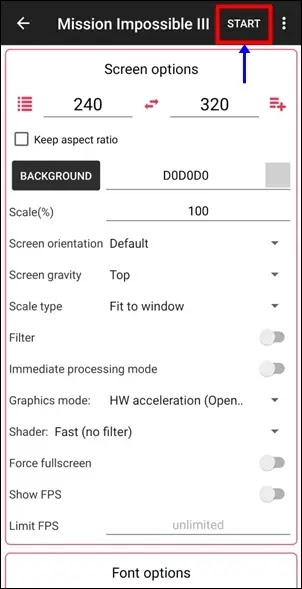
A game settings page will open. Here, you do not need to modify any settings. Just tap the 'START' option in the top right corner to run the game.
You can now start playing the game with the on screen controls. You can enjoy your Java (.jar) games either in landscape or portrait mode. Also, read: how to play PS1/PSX games on Android.

If you enjoy retro mobile gaming, you can also explore other classic console setups like SNES games on Android, Windows and Mac.
Java (.JAR) Games Running on Android – Video Demo
This short video shows Java (.JAR) games running on Android using an emulator setup.
Why Some Java (.JAR) Games Don’t Work Properly On Android
Not every Java (.JAR) game will run perfectly, and that’s normal. These games were originally built for old Nokia and keypad phones, so modern Android emulators like J2ME Loader are doing a lot of translation in the background.
Some games may load fine but feel a bit off — like stretched screens, missing sounds, or slightly slow performance. A few titles might not open at all if they use very old or heavily customized J2ME features.
Also, control mapping isn’t always perfect. Games designed for physical keypads sometimes take a little adjustment when played with touch controls on Android.
In short, most popular titles work well, but a few may need trial and error before they run smoothly.
Conclusion
That’s all you need to run old Java (.JAR) games on Android using an emulator like J2ME Loader.
Keep your .jar files in a folder on your phone, open them inside the emulator, and start playing. Controls are simple and fully touch-based, so everything runs directly on Android without extra setup.
Stick to trusted sources when downloading files and scan them before opening.
If you want to explore more retro gaming setups, you can also try playing PSP games using PPSSPP on Android.


%20Games%20on%20Android%20and%20PC.webp)


Good old days. I owned a Nokia 6681 back in 2006 and used it to play Java games. Prince of Persia series was my favorite. After reading this post I felt a bit nostalgic and tried to play some games back from 2006, luckily I have a 20 year old backup of these games on my PC. After following the instructions, I found that games were running pretty smooth, the only issue was the keypad as a hardware keypad is much easier to play with. Anyways, thanks for bringing these games back to reality again.
ReplyDeleteThanks, Paul! Glad to hear you got those old Prince of Persia Java games running again. The Nokia 6681 was a classic, and you're right—nothing beats the feel of a real keypad for those Java games. Enjoy the nostalgia!
DeleteI remember playing those tiny Java games on my Nokia N72. I mainly enjoyed Gameloft Java games and still play them on my phone. Thank you for posting this tutorial.
ReplyDeleteThank you Bob for sharing your experience.
Delete